AlwaysVPN is a hosted virtual private network. Our service creates an encrypted link between your computer and our servers and then forwards all of your internet traffic through this link.
For example this prevents local eavesdroppers from listening in on your web communication at a public WIFI hotspot. Furthermore unlike many other commercial VPN’s that may be blocked by firewalls our program can work on any Internet connection that allows you to browse web sites. The service is provided for free by showing advertising at the top of web pages that you view while you are using the AlwaysVPN network. AlwaysVPN is still in early BETA. DOWNLOAD : =================================================== Program ini merupakan pengembangan dari OpenVPN yang langsung terintegrasi dengan protocol UDP atau TCP yang dapat dipilih. Cara Install & Running :
- Tunggu sampai tray icon warna hijau. Percobaan : |
Sunday, November 30, 2008
Virtual Private Network - AlwaysVPN


Thursday, November 27, 2008
Internet ProXL, Pulsa dan Browser HP
Opera symbian, opera mini java, opera mini mod, UCWEB symbian, UCWEB java, Teashark. Mungkin browser-browser tersebut yang menjadi pilihan untuk “mengratiskan” pemakaian internet proxl. Pakai symbian version, jelas sudah tidak bisa sebab direct. Opera mini dan opera mini mod juga agak sulit, sedangkan UCWEB harus diset direct…. Tapi itu di proxl masa tenggang dan pulsa 0 rupiah…. bagaimana dg proxl berpulsa?
Untuk memperpanjang umur, akhirnya kuisi juga kartuku
Hah ?? padahal baru isi pulsa…. kucoba browse alamat lain (website ini), hasilnya bisa!! Wah… proxl buka websitenya sendiri tidak bisa Kuganti UCWEB 6 java… kok kepotong ? padahal dipulsa 0 bisa…. Kuganti Opera mini mod 3.11, hasilnya –> bisa buka alamat yg kumasukkan, padahal di pulsa 0 tidak bisa. Cek pulsa, kepotong Kuganti teashark, hasilnya –> aman |
 terus apa yang kudapat? Pertama, kulakukan browse lewat browser bawaan HP ke alamat http://wap.xl.co.id dan http://wap.liveinhand.com dan apa yang kudapat ?
Friday, November 21, 2008
Your Freedom with mIRC
mIRC is a full featured Internet Relay Chat client for Windows that can be used to communicate, share, play or work with others on IRC networks around the world, either in multi-user group conferences or in one-to-one private discussions.
It has a clean, practical interface that is highly configurable and supports features such as buddy lists, file transfers, multi-server connections, SSL encryption, proxy support, UTF-8 display, customizable sounds, spoken messages, tray notifications, message logging, and more. mIRC also has a powerful scripting language that can be used both to automate mIRC and to create applications that perform a wide range of functions from network communications to playing games. mIRC has been in development for over a decade and is constantly being improved and updated with new technologies. The most recent changes can be found on the latest news page. To get started, you can download mIRC now from the download page. ==================================================
|
 , on November 21st, 2008 at 6:46 pm Said: Edit Comment
Wednesday, November 19, 2008
Your Freedom with ProxyCap
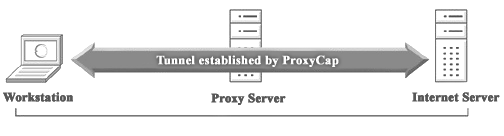
| ProxyCap enables you to tunnel Internet applications through HTTP, SOCKS v4, and SOCKS v5 Proxy Servers. You can tell ProxyCap which applications will connect to the Internet through a proxy and under what circumstances. This is done through a user friendly interface, without the need to reconfigure any of your Internet clients. ProxyCap provides flexible rule system and allows you to define your own “tunneling” rules. You can add a new rule with just a few mouse clicks.
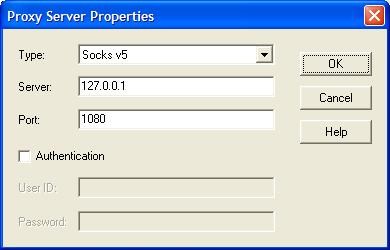
ProxyCap is a powerful yet easy to use “socksifier”. It works by replacing system calls that open network connections directly by ones that open network connections through a proxy; the application won’t notice the difference. ProxyCap decides based on a rule set if an application should use a direct connection or go through a proxy. We’ll come to this later, first we need to download and install ProxyCap. Click on “Proxies”, then click on the “New” button (the folder with the star). Fill in this (or, if Your Freedom is not running on the same PC, fill in the Your Freedom PC’s IP address):
The first proxy entry will automatically become the default proxy. Now click on “Rules”. Rules decide whether or not a connection is to be made through the proxy or directly. They get evaluated from to to bottom, and the first match is taken. Click on the “New” button to see what rules look like. Rules match on four things:
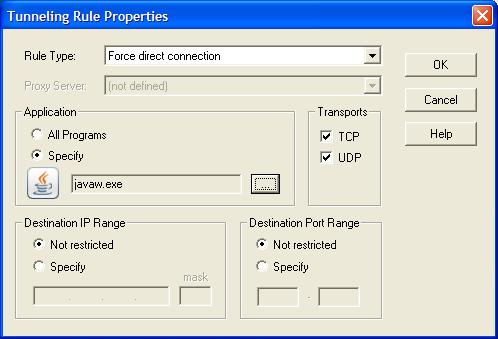
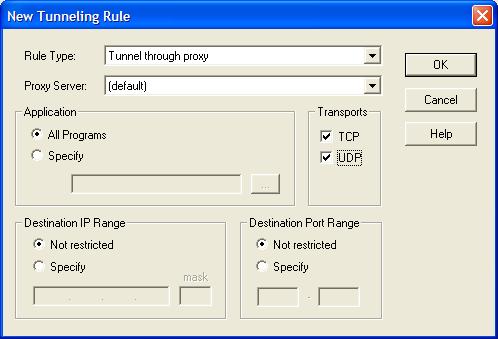
In most cases your rules will simply match on specific applications, all transports, all destination IPs and all destination ports. At first we need to create an exclusion rule that excludes Your Freedom from the redirection — it can’t connect through itself! Choose “Force direct connection”, choose both “TCP” and “UDP” and do not restrict destination IP and port. Then for application, select “specify” because we want this rule to be application specific, then click on the Browse button. Now, depending on which installation type of Your Freedom you are using, do one of this:
Your rule should now look like this:
If you use more than one version of Java or you upgrade your Java installation to a new version, be sure to exclude all relevant “javaw.exe” files (in separate rules)! Also, if you are running the YF client with a console to help us troubleshooting, you need to exclude “java.exe” as well. Also, if you have both the NSI installer and the Excelsior installer on your system, be sure to create rules for both. OK, so now we have made sure that the Your Freedom connection will stay up no matter what else we do. The next step is to add a catch-all rule that redirects everything else through Your Freedom. It should look like this:
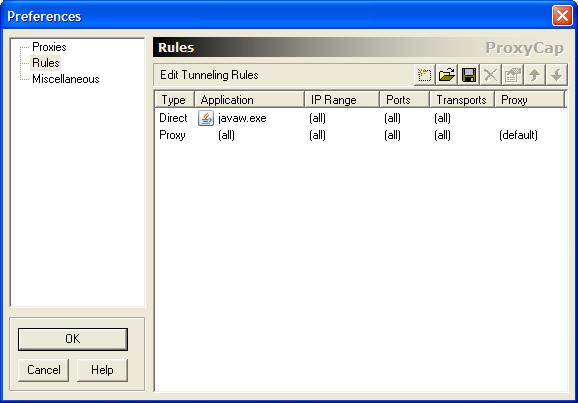
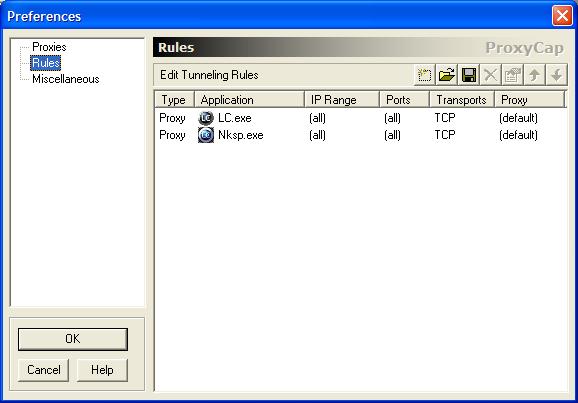
This is how your whole rule base should now look (you may have more than one “direct” line):
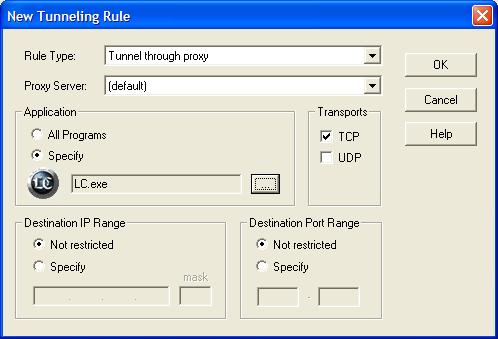
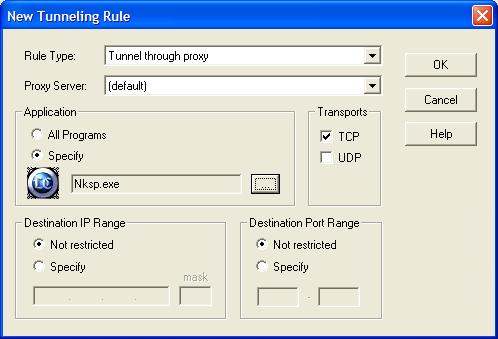
And that’s all you need to do! Whenever ProxyCap is running, all your applications except Your Freedom will go through Your Freedom now. But please remember that you may not configure any proxies inside these applications! If you do (because you need it when Your Freedom is not up), you should exclude your local network range in the catch-all rule and let the applications still use the normal proxy even if ProxyCap. Instead of redirecting all applications through Your Freedom, you may prefer to do it individually only for those applications that need it. If you just want to make that game of yours work, this is the way for you. You don’t create exclusion rules as above. Instead, click on the New button (the folder with the star) and create entries for your individual application. You need to create one record for every EXE file your application contains! Here’s an example for a game called “Last Chaos” — it consists of two EXE files, so we need two rules :
In this example we have only redirected TCP traffic — not for any particular reason, but because it’s enough. If you want to be on the safe side, redirect both TCP and UDP. You must make sure that your applications do not have their own proxy settings if you create rules for them here. After all, if you can configure the proxy in the application you don’t need ProxyCap! Your Freedom Forum |
Sunday, November 16, 2008
Your Freedom with Proxifier
| Proxifier is a program that allows network applications that do not support working through proxy servers operate through a HTTP or SOCKS proxy server or a chain of proxy servers. With Proxifier you can easily tunnel all connections on the system or separate applications. There are many network applications that do not support working through proxy servers and thus cannot be used behind a LAN or firewall(s). These can compromise corporate privacy and lead you to many other restrictions. Proxifier solves all of these problems and gives you the opportunity to work with your favorite software without any restrictions. Additionally, it lets you gain extra control over network security, create a proxy tunnel and add more power to network functionality.
Proxifier allows you to:
Set up Check all OPTIONS except
And click SAVE and Exit Run Proxifier click in Options, Proxy Settings… Add with the following
And OK
OK
Now you run you application, you should feel better speed less lag, I love to receive feedback on this and tell me if you application / game gets any better/worse From : Your Freedom Forum |
| Posted: 15 Nov 2008 04:14 PM PST OpenVPN is a full-featured open source SSL VPN solution that accommodates a wide range of configurations, including remote access, site-to-site VPNs, Wi-Fi security, and enterprise-scale remote access solutions with load balancing, failover, and fine-grained access-controls. Starting with the fundamental premise that complexity is the enemy of security, OpenVPN offers a cost-effective, lightweight alternative to other VPN technologies that is well-targeted for the SME and enterprise markets.
OpenVPN combines security with ease-of-use OpenVPN’s lightweight design sheds many of the complexities that characterize other VPN implementations. The OpenVPN security model is based on SSL, the industry standard for secure communications via the internet. OpenVPN implements OSI layer 2 or 3 secure network extension using the SSL/TLS protocol, supports flexible client authentication methods based on certificates, smart cards, and/or 2-factor authentication, and allows user or group-specific access control policies using firewall rules applied to the VPN virtual interface. OpenVPN is not a web application proxy and does not operate through a web browser. ======================================================= Mungkin kita sudah banyak membahas Your Freedom dan OpenVPN pada kesempatan sebelumnya dan mungkin sudah banyak yang mengerti cara penggabungan ini. Tetapi dikarenakan masih banyak yang menanyakan tentang OpenVPN, maka pada kesempatan ini akan ku posting secara lengkap….
Di Your Freedom >> configuration >> openvpn setting masukkan alamat tempat OpenVPN terinstall.
Lakukan setting configuration >> server selection sesuai kebutuhan
Save and exit.
Start Connection Your Freedom….
Dan di Message akan terdapat tulisan OpenVPN ready
Jika pintu Your Freedom tidak terbuka setengah (seperti tanpa menggunakan Your Freedom), atau di message, terdapat tulisan “could not executes……” (warna merah)
Coba masuk ke windows services dan lihat OpenVPN service apakah sudah start…
|


Friday, November 14, 2008
Vidalia Bundles - Includes Tor software and Privoxy
While there are many different public open proxies on the Internet today, the Tor onion router network is specifically about providing users with a degree of privacy and anonymity. The Tor project claims that hundreds of thousand of people use the Tor network to provide privacy. Though Tor is popular, by itself it's not quite as easy to take advantage of as it could be and that's where Vidalia comes in.
Vidalia is a packaged application that includes Tor, the Privoxy local proxy as well as the Vidalia GUI for managing the Tor experience. With the one Vidalia download, you end up with a local Privoxy proxy loaded on your local PC with an instance of Tor to connect through for privacy. Displays Status of the Tor software
Vidalia runs in your system’s notification area, changing its icon to indicate the status of the Tor software. You will know at a glance if the Tor software is working or not without taking up a lot of screen real estate. View Log Messages
The message log displays informational messages that Vidalia gets from the Tor software. You can select which types of messages you’d like to see, have them automatically logged to a file, or search through your message log for specific messages. Map of the Tor NetworkVidalia shows you a map of the Tor network, plotting points for each relay and drawing the path of your circuits through the network. You can also view details about relays, including their bandwidth and uptime, as well as monitor the status of your application connections through the Tor network. Monitor Bandwidth Usage The bandwidth graph lets you keep an eye on how much data you’re sending and receiving through the Tor network. Configure Tor The configuration dialog allows you to configure aspects and behaviors of both Vidalia and the Tor software. The Tor network is made up of volunteers all over the world who care about Internet privacy. Vidalia helps you contribute to the Tor network by making it easy to set up and configure a relay. Get HelpThe Help dialog allows you to find help documentation about Vidalia. Support for Translations
We currently have translations for Vidalia in several languages, but we need your help translating Vidalia into more languages and keeping our current translations up to date! We also need help translating our help content. Check out our instructions for translators if you want to help!
| ||||||||||||||||||
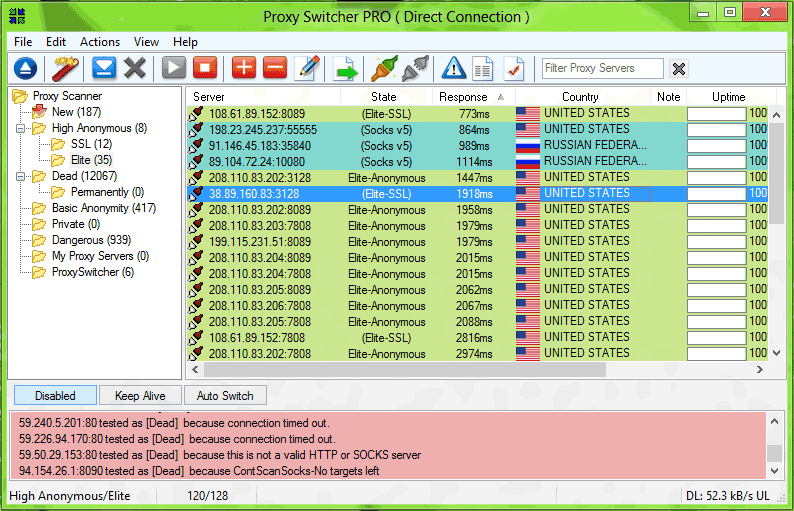
| Proxy Switcher - surf anonymously Posted: 13 Nov 2008 07:50 PM PST Proxy Switcher - surf anonymously change proxy settings on the fly
The solution is to use Proxy Switcher for all the anonymous browsing needs. It can be used to avoid all sorts of limitations imposed by various sites. Be that a download site that limits amount of downloads. Or video site works only in a particular country - more often than not it gets defeated by the anonymous browsing features Proxy Switcher provides. On top of that, if you used to manually change proxy settings Proxy Switcher provides a way to change them much faster and easier. Proxy Switcher Benefits
URL http://www.proxyswitcher.com Proxy Browser : 127.0.0.1:3124 | ||||||||||||||||||