Showing posts with label Internet Gratis. Show all posts

Tuesday, September 30, 2008

Upgrade Wordpress Version 2.6.2 dengan Wordpress Automatic Upgrade

WordPress (Version 2.6.2)

The latest stable release of WordPress (Version 2.6.2) is available in two formats from the links to your right. If you have no idea what to do with this download, we recommend signing up with one of our web hosting partners that offers a one click install of WordPress or getting a free account on WordPress.com.

What’s Next?
With our famous 5-minute installation, setting up WordPress for the first time is simple. We’ve created a handy guide to see you through the installation process. If you’re upgrading your existing installation, we’ve got a guide for that, too. And should you run into any trouble along the way, our support forums are a great resource, where seasoned WordPress experts volunteer their time to help you get the most out of your blog.

Wordpress Automatic Upgrade allows a user to automatically upgrade the wordpress installation to the latest one provided by wordpress.org using the 5 steps provided in the wordpress upgrade instructions.

Wordpress automatic upgrade

Wordpress automatic upgrade upgrades your wordpress installation by doing the following steps.

  1. Backs up the files and makes available a link to download it.
  2. Backs up the database and makes available a link to download it.
  3. Downloads the latest files from http://wordpress.org/latest.zip and unzips it.
  4. Puts the site in maintenance mode.
  5. De-activates all active plugins and remembers it.
  6. Upgrades wordpress files.
  7. Gives you a link that will open in a new window to upgrade installation.
  8. Re-activates the plugins.

The plugin can also can be run in a automated mode where in you do not have to click on any links to go to the next step.

=================================================================

Melihat beberapa website telah gagal mengupdate wordpress, timbul keraguan untuk mengupdate wordpressku ini ….

Tetapi seperti di beritakan oleh wordpress.org, yang baru saja mereka merilis wordpress versi 2.6.2, disarankan kepada pengguna mulai versi 2.6.1 kebawah untuk mengupdate ke versi 2.6.2. Hal ini disebabkan oleh salah satu celah keamanan SQL Column Truncation dan kelemahan fungsi mt_rand() yang telah diperbaiki. Celah keamanan itu, dapat menyebabkan kemungkinan password user bisa di reset atau di ubah ke acak jika blog kita mengijinkan pengguna untuk ikut bergabung (open registration). Dan ini merepotkan user jika hal tersebut terjadi. Dan dengan serangan yang berulang-ulang maka kemungkinan password juga bisa di tebak atau di-hack.

Dari sebab-sebab diatas, akhirnya kuberanikan diri untuk meng-updatenya ….. Setelah cari-cari di google, cara yang paling aman untuk update wordpress, yaitu menggunakan plugins Wordpress Automatic Upgrade. Setelah plugins ini di install, untuk upgade tinggal beberapa kali klik dan mengikuti langkah-langkah yang dituntunkan. Pastikan untuk menyimpan backup data yang telah di hasilkan.

Ketika kita masuk ke halaman administrator, maka akan ditampilkan informasi bahwa wordpress 2.6.2 telah tersedia, maka diharap segera update ( WordPress 2.6.2 is available! Please update now). Masukkan :

  • FTP Username
  • FTP Password
  • FTP Base Directory (The root dir where wordpress is installed)
  • FTP Host

Kemudian lakukan download …

Kemudian lakukan backup seperlunya …

Kemudian lanjutkan sesuai yang diperintahkan oleh plugins ini. Selama proses berlangsung, mulai check awal, database backup, mematikan dan menghidupkan plugins Wordpress semua serba otomatis, mudah dan cepat.

Silahkan di coba….

ariefew

Dasar WI-FI dan Wireless LAN (WLAN)

Wi-Fi is the trade name for the popular wireless technology used in home networks, mobile phones, video games and more. In particular, it covers the various IEEE 802.11 technologies (including 802.11n, 802.11b, 802.11g, and 802.11a).

A wireless LAN or WLAN is a wireless local area network, which is the linking of two or more computers or devices without using wires. WLAN uses spread-spectrum or OFDM modulation technology based on radio waves to enable communication between devices in a limited area, also known as the basic service set. This gives users the mobility to move around within a broad coverage area and still be connected to the network.

=============================================================

Standard WLAN 802.11 disahkan oleh IEEE pada tahun 1997. Standard ini berlaku untuk kecepatan 1 Mbps dan 2MBps. Standard ini difokuskan pada lapisan 1 dan 2 dari model OSI yaitu physical layer dan data link layer. Untuk memenuhi kebutuhan kecepatan yang lebih tinggi maka pada tahun 1999 dikeluarkan standar 802.11b dengan kecepatan 5.5Mbps dan 11Mbps.

Keuntungan Penggunaan Wireless

Dunia usaha dalam berbagai ukuran sangat beruntung dengan mengoperasikan sistem WLAN yang mampu memberikan kombinasi yang baik antara truput yan mendekati jaringan kabel, akses mobile, dan konfigurasi yang fleksible. Keuntungan ekonomis yang akan diperoleh dapat mencapai US$16,000 / user (di US) – di ukur dari produktifitas pekerja, effisiensi organisasi, keuntungan, dan penghematan biaya – di bandingkan alternatif menggunakan kabel. Beberapa keuntungan utama WLAN adalah:

  • Mobilitas yang akan meningkatkan produktifitas dengan akses real-time terhadap informasi, tidak peduli lokasi pekerja, agar lebih cepat & lebih effisien dalam pengambilan keputusan.
  • Setup jaringan lebih cost effective daripada lokasi yang sulit di pasang kabel seperti gedung tua atau bangunan dengan tembok yang masif.
  • Pengurangan cost of ownership – terutama di lingkungan yang dinamis yang membutuhkan modifikasi yang sangat sering – kita harus berterima kasih karena sedikitnya wiring dan biaya instalasi per alat dan per user.
  • WLAN memerdekakan user dari ketergantungan pada akses kabel ke backbone jaringan, memberikan mereka akses jaringan kapan saja, dimana saja. Kebebasan untuk roaming ini memberikan banyak keuntungan dalam berbagai lingkungan pekerjaan, seperti:
    • Akses informasi secara langsung di samping tempat tidur pasien bagi dokter & staff rumah sakit.
    • Kemudahan, akses jaringan secara real-time untuk auditor / konsultan on-site.
    • Kemudahan akses database bagi supervisor yang bergerak, seperti manager di production line, auditor gudang, maupun engineer di konstruksi.
    • Membuat konfigurasi jaringan lebih simpel tanpa perlu keterlibatan orang MIS untuk setup sementara seperti di pameran atau ruang konferensi.
    • Akses yang lebih cepat kepada informasi tentang pelanggan oleh vendor / retailer yang menyebabkan perbaikan layanan pelanggan dan perbaikan customer satisfaction.
    • Akses ke jaringan yang tidak terikat pada lokasi bagi administrator jaringan, untuk kemudahan dukungan on-site pada saat troubleshooting & support.
    • Akses real-time bagi pertemuan-pertemuan kelompok belajar untuk siswa / mahasiswa.

Oleh karena itu kelebihan yang ditawarkan oleh WLAN, terutama protable, kemudahan instalasi and kepraktisan. Faktor yang sangat menarik dari WLAN adalah kemudahan, karena dia memungkinkan fleksibilitas dan roaming. Seorang user tidak harus terikat dalam sebuah LAN, dia dapat bergerak tanpa perlu terputus hubungan komunikasinya. Di samping itu, WLAN juga mudah untuk di instalasi, untuk membangun seluruh jaringan dibutuhkan waktu beberapa jam saja di bandingkan beberapa hari jika kita menggunakan kabel. Juga, WLAN dapat di instalasi di daerah dimana rewriring tidak memungkinkan. Sistem tanpa kabel ini dapat di instalasi di berbagai lingkungan, dan user dapat berkomunikasi dengan jaringan yang menggunakan kabel melalui access point (AP) atau wireless adapter.

Konfigurasi WLAN

WLAN terdiri dari 2 perangkat yaitu:

  • Wireless Station (WS) : dekstop, laptop maupun PDA yang dilengkapi dengan wireless NIC
  • Access Point (AP) : berfungsi sebagai bridge antara jaringan LAN konvensional dan WLAN

Terdapat 2 jenis mode operasi WLAN yaitu:

  • Infrastucture Mode, terdiri dari
    • Basic Service Set (BSS), hanya terdapat satu Access Point
    • Extented Service Set (ESS), dua BSS atau lebih membentuk satu buah subnet
  • Ad-hoc Mode, terdiri dari beberapa wireless station yang berkomunikasi secara langsung (peer-to-peer) tanpa menggunakan AP.

Infrastucture Mode

Ad-hoc Mode

Koneksi dalam BSS

Proses terbentuknya koneksi dari WS ke AP dalam suatu BSS adalah sebagai berikut:

  • AP mengirim sinyal beacon yang berisi SSID (Service Set Identifier). SSID merupakan setting di AP yang digunakan mengelompokkan WS dalam suatu segmen jaringan. Hanya WS yang mengetahui SSID tersebut yang dapat bergabung dalam jaringan tersebut. SSID dapat dianggap sebagai shared password.
  • Ketika WS berada dalam daerah cakupan sebuah atau beberapa AP, maka WS akan memilih salah satu AP berdasarkan kuat sinyal dan error rate yang diterima. Secara periodik WS akan memantau untuk mengetahui sinyal yang paling kuat. Jika ditemukan maka WS akan memilih AP yang baru tersebut.
  • Untuk bergabung dalam jaringan, maka WS harus melakukan koneksi ke AP. WS harus menyebutkan SSID yang sesuai untuk bergabung dengan AP yang telah dipilih tersebut. Beberapa AP yang memiliki SSID yang sama akan membentuk ESS.
  • Beberapa NIC WS bisa diset SSID nya dengan Any atau * (asterik) sehingga dia dapat bergabung dengan AP mana saja yang paling kuat sinyalnya tanpa mempedulikan SSID.

Sinyal WLAN

WLAN menggunakan sinyal radio pada frekuensi 2.4Ghz. Dalam implementasi WLAN, letak AP diatur sedemikian sehingga hanya memiliki cakupan tertentu yaitu wilayah operasi pemakai WLAN yang sah misalnya satu lantai tertentu dalam suatu gedung. Namun sinyal radio ini dapat merambat menembus dinding dan lantai bangunan meskipun sinyal menjadi lemah. Dengan demikian sangat mungkin sinyal tersebut keluar dari daerah cakupan yang semestinya. Luberan sinyal ini dapat merambat keluar sampai beberapa ratus meter dari gedung apalagi jika AP diletakkan tanpa memperhatikan masalah luberan sinyal ini misalnya ditempatkan dekat dengan jendela yang menghadap luar gedung.
Dengan menggunakan antena terarah (directional) dan kalau perlu menggunakan penguat sinyal sinyal radio (RF amplifier) maka sinyal radio yang telah lemah tadi dapat ditangkap kembali pada tempat yang relatif jauh.

MicroEmulator & Opera Mini Mod

Microemulator is J2ME Device Emulator is pure Java implementation of J2ME in J2SE. It allows demonstrate MIDlet (MIDP/CLDC) based applications as a standalone Java application or as web browser applet.

Context:
1. Running application
2. Applet config
3. Building MicroEmulator from sources

Requirements:
- J2SE 1.4+

There are two methods of running apps in emulator:

1. As an application:

  • java org.microemu.app.Main (MIDlet application main class) or, java org.microemu.app.Main (MIDlet jad file)
    • microemulator.jar must be in CLASSPATH
  • java -jar microemulator.jar (MIDlet application main class) or, java -jar microemulator.jar (MIDlet jad file)
    • (MIDlet application main class) parameter is optional, if used MIDlet application jar file must be in CLASSPATH
    • (MIDlet jad file) must have .jad extension,
    • for Nokia UI support include nokiaui.jar to the CLASSPATH,
    • for Siemens API support include siemensapi.jar to the CLASSPATH.

2. In applet:

Preparing applet version of MIDlet should be done by selecting Save for Web menu item from File menu
in standalone MicroEmulator application. During that process additional MIDlet bytecode modification
is performed in order to satisfy some compatibility issues running Java ME code inside Java SE.

Produced html code:


- for Nokia UI support include nokiaui.jar to the archive attribute,
- for Siemens API support include siemensapi.jar to the archive attribute.
There is additional parameter in applet definition tag if you want start applet with another device than default:

eg. minimum phone included in distribution has org/microemu/device/minimum/device.xml

and remember to include new device jar into applet archive tag
eg. minimum phone included in distribution has minimum.jar

Example for SimpleDemo MIDlet, Nokia UI support and Minimum device:


Example for SimpleDemo MIDlet and Minimum device with Mouse and color:


Example for SimpleDemo MIDlet and Large Skin:


3. Building MicroEmulator from sources

We are using maven2 to build project

To build project you need this environment variables:
JAVA_HOME, SWT_HOME (to build swt module) and WTK_HOME to compile and test MIDlets

To create Eclipse projects run:
mvn eclipse:clean eclipse:eclipse -DdownloadSources=true

To run build without tests:
mvn -Dmaven.test.skip=true

DOWNLOAD MICROEMULATOR 2.0.2

OPERA MINI MOD

konfigurasi:

  1. double-click “microemulator.jar”. atau ketik “java -jar microemulator.jar” di console (Command Prompt). (Anda harus memiliki JRE agar bisa menjalankan ini)
  2. lalu ke “Options > Select device”, klik “Add…”, terus ke “microemulator\devices” pilih “microemu-device-resizable.jar”
  3. pilih “Resizable device” lalu “Set as default”
  4. klik “Resize” dan masukan ukuran yang anda inginkan (misal sesuai ukuran monitor anda)
  5. trus “File > Open JAD” pilih opera mini jad yang tadi kamu download
  6. “Opera Mini” muncul di daftar, klik “Start”

Save page dan download :

  1. Buat shortcut untuk microemulator.jar dengan cara klik kanan -> create shortcut
  2. Klik kanan shortcut tersebut - Properties - timpa field targe dengan : C:\WINDOWS\system32\java.exe -cp microemulator.jar;lib/microemu-jsr-75.jar org.microemu.app.Main –impl org.microemu.cldc.file.FileSystem org.microemu.examples.fcview.FCViewMIDlet apps\mini.jad
  3. edit file config2.xml di C:/Documents and Settings/usernamekamu/.microemulator/config2.xml menggunakan text editor (misal notepad / notepad++ dll)
  4. tambahkan baris-baris berikut sebelum


  5. org.microemu.cldc.file.FileSystem


  6. Save
  7. Jalankan microemulator dengan klik dua kali pada shortcut yang tadi dibuat
  8. Selesai, fitur save web page muncul

proxy untuk browsing :

Edit config2.xml di C:/Documents and Settings/usernamekamu/.microemulator/config2.xml


…


…

ganti webcache.mydomain.com dengan proxy kamu dan 8080 dengan port proxy yang kamu gunakan.

ariefew.co.cc

Opera Mini Mod v.3.10

Opera Mini Mod
Version 3.10.11508 (11/06/08)

Opera Mini is a web browser designed primarily for mobile phones, but also for smartphones and personal digital assistants. It uses the Java ME platform and consequently requires that the mobile device be capable of running Java ME applications. Opera Mini is offered free of charge, supported through a partnership between its developer, the Opera Software company, and the search engine company Google.

Opera Mini was derived from the Opera web browser for personal computers, which has been publicly available since 1996. Opera Mini began as a pilot project in 2005. After limited releases in Europe, it was officially launched worldwide on January 24, 2006.

Opera Mini requests web pages through the Opera Software company’s servers, which process and compress them before relaying the pages back to the mobile phone. This compression process makes transfer time about two to three times faster, and the pre-processing smooths compatibility with web pages not designed for mobile phones.

Features
Scrolling is achieved with the device’s arrow keys, its number keys, or a stylus.
Opera Mini may also be set to landscape mode, where it will rotate the page 90 degrees. This is useful for screens that are significantly taller than they are wide. However, this feature is not yet available on BlackBerries and some other devices.
The image quality may be set to “Low”, “Medium”, or “High”. The higher the image quality, the more data is transferred and the longer it will take to load pages.
Opera Mini supports only one font, which can be set to “Small”, “Medium”, “Large”, or “Extra large” size. If a web page uses Courier or a generic monospace font, the one font is still used, but the characters are spaced out so that each character takes up the same amount of space.

Browsing tools

Opera Mini features a search bar capable of using several pre-configured search engines, with the user being able to add additional search engines. The default search engine is Google.
Additionally, Opera Mini features shortcut keys, skins, and a web feed aggregator. It can save bookmarks, download files, and it remembers the user’s browsing history.

Privacy and security

When using Opera Mini 4.0 or 3.0 Advanced, the connection between the mobile device and the proxy server is always encrypted for privacy and security. The encryption key is obtained on the first start by requesting that the user press random keys a certain number of times. When using Opera Mini 3.0 Basic, the connection is not encrypted. Opera Mini has received some criticism because it does not offer true, end-to-end security when visiting encrypted sites such as PayPal.com. When visiting an encrypted web page, the Opera Software company’s servers decrypt the page, then re-encrypt it themselves, breaking end-to-end security.

Standards support

As of version 4, Opera Mini uses the same layout engine that will be included in Opera 9.5, the next version of the desktop edition of Opera.web standardsScalable Vector Graphics or Web Forms 2.0. Also, frames are flattened because of client limitations, and dotted and dashes borders are displayed as solid borders due to bandwidth and memory issues. And because Opera Mini reformats web pages, it does not pass the Acid2 standards compliance test. This means that Opera Mini supports almost all of the supported in Opera 9.5. However, unlike the desktop edition of Opera, Opera Mini includes no support for
Opera Mini supports bi-directional text, meaning that it can display text in right-to-left languages such as Arabic and Hebrew in addition to left-to-right languages like English, French, and Spanish.

Low-memory device support

For MIDP 1, low-memory devices, the older Opera Mini 3 Basic is still available. Its features include an option to increase the text size, as the default text size is too small for some web sites. Opera Mini 3 Basic uses less advanced compression, does not support full page view, does not include support for favicons, does not scroll as smoothly, does not feature a built-in clock, and does not support encryption. When browsing an encrypted web page with Opera Mini 3 Basic, the page is actually decrypted before being sent to the mobile phone.

Change Log
3.10 (11508) 11/06/08 list of the changes

Version 3.10 is based on the official version of hifi of v.3.1.10423 from 29.02.2008 and contains practically all functions of last modification 2.07 ([of].[versiya] of v.2.0.4509 from 04.07.2006).
This version has a number 3.1, undertaken from the base program and 0, as to [podversiyu], t [k] it is test and base for the entire (future?) the rule of 3.xx.
Tuning, preserved pages, [bekap] from the previous versions do not approach.
You follow the correctness of the installation of date and time in the telephone, otherwise, server will refuse to you in the discovery of pages with the communication: “The error of checking the certificate of server. Verify the installations of date on your device.”.

[It is added]

* 25.05.08 [v] charger the disconnected the checking of the presence of vacant place under the inject rocking file.
* 25.05.08 [v] charger, to the field of the introduction of way for the [media]- file is added the button of survey.
* 19.05.08 export and the import of layings with [ikonkami], [vnedrennymi] into the body of htm of file. The file of export is obtained one, but with [ikonkami].
* 17.05.08 separately is fixed the value of java-heap for the return to server and the size of buffer for the discovery of files in the editor (traffic \ memory).
* 17.05.08 discovery and correcting files in the HEX- regime. Showing of symbols for HEX- given in the codings ISO and WIN. Alternative type of the showing of text files (decrease of the consumption of memory).
* 09.05.08 sonic notification in charger and FTP. On each model of presetting they will sound on its!
* 04.05.08 after search, the obtained text is separated on the page. Color is added into the color diagram.
* 01.05.08 [v] of history [poseshchenye] pages are sorted on the date of last visit. Packing on the date depends on jackdaw to displace contents. In tuning of navigation it is possible to include the retention only of last [poseshchennoy] page for one [khosta].
* 29.04.08 support of reading the pages, [sokhranennykh] by the versions of 2.xx.
* 23.04.08 jackdaw to forced devastation of buffer in the charger and FTP during the record to the disk. Compulsorily must be switch oned for Sagem.
* 23.04.08 [v] of the menu of windows (panels) is added passage to the previous window (panel).
* 22.04.08 is altered upload of files - file is not stored into the tele- pages (but the permissible size of the sent file it did not increase especially). Photographs from the camera, as before are located in the tele-.
* 19.04.08 file [menezhder] has two panels with the separate ways. Switching between the panels through the menu of navigation. The number of panel is indicated on the upper border before the indication of way.
* 18.04.08 selection of permission for the photograph by camera.
* 12.04.08 for the models with the sensory screens into the contextual menu are added commands for emulation of pressure # and *, for the use in the hot, which then can be selected in the floating up window. (18.04.08 it is removed pause into 1,5[sek] during emulation of pressure #* in the contextual menu)
* 10.04.08 possibility of retaining the page, on which arose the error with [parsinge], for the transfer to me If page does not have menu for the selection of retention, then place the retention of page on the hot.
* 10.04.08 [po] #1 and on the discovery of reference in the window, the address of reference is added in the field of the introduction of address.
* 7.04.08 http-proxy for the discovery of pages. It works only for the protocol of http.
* 7.04.08 C[mena] and the addition of servers Ohm.
* In FTP is added the conversion of the names of the files of [v]/[iz] CP-1251, for the servers, who work in this coding.
* In FTP the showing of the concealed files on the server depends on jackdaw “concealed files” in the file manager.
* During creation or renaming of folder in the layings, with the name, which exists in the current catalog, to the new name is added [the number].
* The prohibition of passage according to the references with the already neglected task of the discovery page in one of the panel of program is included on. It is made so, because the outgoing and entering packets are ciphered with the code, which is changed in the real time.

[change]

* 04.06.08 change in determination and installation of the dimensions of the field of introduction and text block.
* 03.06.08 passages between the panels and the windows, with the neglected process in FTP.
* 26.05.08 additions to the discovery JPG with the large permission.
* 24.05.08 tuning of colors in the new performance.
* 20.05.08 jackdaw into the Tuning- form: To develop on entire screen, in the previous versions worked as the start of complete screen for duplicating of [softov], now includes and disconnects the [polnoekrannyy] regime of application independently of [funktsiii] of duplicating. It is added in the list of hot.
* 15.05.08 numbers of pages with the survey of text displace.
* 14.05.08 width of the active region of the wear and tear of commands on the lower border of [uvelichina] (for the sensory screens) but only with the shown lower border.
* 14.05.08 button of the survey of file for the indication of way or file, are fastened to the right of the field of introduction.
* 13.05.08 some reference- commands in the system windows are substituted to the buttons.
* 13.05.08 search in the editor of files also illuminates the obtained words.
* 08.05.08 jackdaw for the isolation of the obtained text in the entire current panel.
* 05.05.08 [Izmenen] the method of adding the hot, now old installations must not be dropped, if in the hot there was only addition.
* 05.05.08 [v] hot are added left and right [softy]. Assigned hot to these functions should be without the preliminary [*] and [#], otherwise work will not be.
* 05.05.08 with the import of color diagrams from the previous versions shows communication.
* 05.05.08 isolation of the desired text was on all pages in the current panel.
* 02.05.08 expansion of maximum cache and history.
* 01.05.08 separate fields of sorting for the file and FTP - managers.
* 30.04.08 determinant of the codes of the keys for mkey is accessible through the Menu-Information- hot buttons -mkey.
* 23.04.08 smooth warming up is smoother.
* 21.04.08 with the removal of entire history is selected the possibility of removal and list previously the [vvedennykh] addresses.
* 18.04.08 smooth warming up with the shift of cursor downward.
* 13.04.08 (recovery) color diagrams.
* 13.04.08 (recovery) the showing of the return of data into the network.
* 5.04.08 is altered the checking of time out in charger and FTP.
* 5.04.08 is altered the retention of layings, history, prospectors, templates, [vvedennykh] addresses, by analogy with the version of 2.xx. MAKE EXPORT!
* Are altered hot. Now installation occurs not on the previously [razreshennoy] button, but according to the function, by which the desired combination of buttons is appropriated.
o Hot can be dual, with the first button [#] or [*].
o Hot [*] has the larger priority above the laying with the same combination.
* Code of authorization [neeksportiruem] for purposes of safety. For the displacement between the versions use the leaf of paper, which you will then eat, or templates.
* The code of authorization and the code of the coding of data for the exchange with the server is exported with the export of tuning. Do not give out your [bekapy] and do not use strangers.
* [Apload] of files only on “the present” the, i.e., not modified version. [Apload] itself limited - to the page comes file with the name “of photo.jpg” or “photo.png”:
MIME of type - jpeg, if are actually sent image of jpeg or others data, MIME of type - png, if is sent away image to png. There are no limitations to the type of the unloaded file. [NEperezagruzka] of pages in the histories, which are removed from cache on silence it is included on.
*

[correction]

* 08.06.08 correcting of the discovery melodies from file RMS.
* 08.06.08 working of switching the size of screen and panel of file did not conclude where must.
* 08.06.08 to the charger trifle.
* 08.06.08 during correcting or adding the laying, did not show [ikonka] of page in the field of introduction.
* 08.06.08 logotype into [info] about the program was sketched with the fixed sizes (urgently for the designer).
* 04.06.08 with the off module of [multimedia] did not work charger.
* 03.06.08 with the off color diagrams did not show [splesh] with the starting.
* 03.06.08 correcting of determining the dimension of file for file RMS (it did not work [apload] with the old method).
* 27.05.08 sometimes was not restored the concealed load.
* 27.05.08 prohibition of working the pressure of the keys or [stilusa] during tracing of animation.
* 27.05.08 copying of the field of the showing of color in tuning of color diagrams.
* 26.05.08 with the showing of the list of the established hot * is removed the same combination for the layings.
* 25.05.08 selection of element in the list on the system page, shut this page itself (only alternative cache).
* 24.05.08 test from the hovering on SEK750.
* 24.05.08 after the import of color diagram it immediately adapted, and on to preserve was dropped to current that edited.
* 24.05.08 was dropped position on the page after output from the list (alternative cache).
* 24.05.08 after the test of network, on OK, passed to home page, now it returns to tuning of network.
* 23.05.08 showing of the time of a change in the files was without taking into account correction in the tuning form.
* 23.05.08 [v] the window of the change of color screen should not have been expanded.
* 22.05.08 with the survey of text in the coding UTF, did not pass further 2[y] of page.
* 22.05.08-23.05.08 [v] tuning by FTP did not replace the reference of the survey of local catalog to the button.
* 22.05.08 error during unloading of image from the camera.
* 22.05.08 [v] of history strip- limiter to the left it [otrisovyvalas] only for the first 10 expanded blocks.
* 21.05.08 did not work the switching on of fictitious (RMS) file system for cache on the disk with the presence of access to “normal” file system.
* 20.05.08 on the emulator Of esmertec of jbed, during redefining of hot to the literal keys, always showed name as UP.
* 20.05.08 [v] the list 20.05.08 [v] the list hot (Menu-Option- information -[Gor].[knopki]).
* 20.05.08 correcting of testing in tuning of network.
* 16.05.08 correcting of the sending of sms.
* 16.05.08 correcting of the test of connection.
* 14.05.08 with the discovery of reference from the history into the new (background) window, page was not opened.
* 14.05.08 during closing of the panel, in which [idet] the working or the load of page, other panels, the [ozhidayushchiyushchie] ends of this, did not move in the turn.
* 11.05.08 on the small screens (132*176) did not always show date in the history on the convoluted blocks.
* 11.05.08 SK65 and the turning of [klavy].

DOWNLOAD 1
DOWNLOAD 2

ariefew.co.cc

Internet Gratis dengan Opera Mini Mod

Sebenarnya sudah lama kucoba oprek opera mini mod, tapi berkali-kali kucoba install bebagai macam versi yang kudapat, berkali-kali juga mengalami ketidak cocokan. Ketidak cocokan tersebut di HP atau di kartunya, belum kucek lebih jauh. Sampai….. ada komen dari teman kita…..

bodo–>September 17th, 2008 at 10:58 pm

numpang duduk lg ah :-D . mas arief dan kawan2 bhas jg dunk opera mini mod isat! oiya dnger2 opera mini mod axis jg dah keluar ya?

Dari sini, kucoba install dan oprek semua opera yang kumiliki dengan memakai kartu XL-ku yang mempunyai pulsa Rp.0,- dan dalam masa tenggang… dan akhirnya….. berhasil kutemukan opera mini mod 3.10 yang jalan dengan sempurna, tanpa setting apapun.

Tapi bagaimana dengan kartu lainnya? atau dengan kartu XL yang ada pulsanya, apa termakan?

Akan kucoba lebih jauh…….

==============
Hasil Test Sementara
==============

  • Software : Opera Mini Mod 3.10
  • Hp support : Nokia 6210i (s60v3), SE P910i (s-uiq), SE 800i (java-midp2)
  • kartu yg bisa : Pro-XL pulsa 0 …
  • Kartu yang kena pulsa : IM3, Halo …
  • Kartu yang tdk bisa : …

Untuk kartu lain, selain PRO-XL, perlu adanya tambahan (misal modifikasi header) untuk menggratiskannya. Selain Opera Mini Mod yg standar, ada lagi Opera Mini Mod yang dikhususkan untuk kartu-kartu tertentu (misal ISAT, yaitu Opera mini 4.1 Mod)

==============
Instalasi di PRO-XL
==============

setelah file jar terinstall di HP kita, akan ada penyetingan otomatis yang agak lama. Ikuti [yes] terus sampai selesai. Jangan rubah settingan apapun. Buka URL seperti biasa (tanpa tambahan). Support HTTP & HTTPS

===========================
OPERA MINI MOD 3.10 & DOWNLOAD
English Version
===========================

ariefew.co.cc

MASALAH YOUR FREEDOM SULIT KONEK XL

Di MASALAH PRO-XL KAWIN SAMA YOUR-FREEDOM telah dijelaskan bahwa untuk mengatasi sulitnya koneksi YF ke XL yaitu dengan :

Lakukan konfigurasi proxy xl [next]

Jika muncul tulisan hijau anda beruntung, jika muncul tulisan merah biarkan saja (lakukan berulang-ulang, untuk ping proxy xl). Cancel.

Lakukan konfigurasi manual di YF –> proxy XL, server YF, dan lainnya yang telah kubahas sebelumnya. Lakukan searching server YF secara berulang-ulang (untuk ping juga).

Jika tidak menemukan server YF, biarkan [save & exit], atau ulangi lagi searching lagi…

Lakukan koneksi ke server YF. Lakukan berulang-ulang sampai pintu YF terbuka.

Jika pintu YF sulit terbuka padahal cara-cara diatas sudah dilakukan, itu pertanda terjadi “kesalahan” dikoneksi HP (walaupun terlihat konek), maka lakukan salah satu cara dibawah ini :

  • Matikan hidupkan HP
  • Cabut tancapkan kabel data
  • Re-dialup berulang-ulang
  • Set jaringan HP secara manual, pilih jaringan selain XL, matikan hidupkan HP
  • Cari sinyal yang stabil (tidak perlu sinyal full)
  • Hapus cache & temperory browser

ariefew.co.cc

TELPON GRATIS KE 8 NEGARA

Ini merupakan pengalaman dari seorang teman yang menggunakan fasilitas internet untuk menelpon 'teman-temannya' yang ada di Hongkong. 'Teman-teman' itu sebagian besar didapatnya dari chat dan sebagian besar merupakan para TKW yang ada disana :-).

Bagaimana sih caranya ?

Chat dan masuk aja ke room tertentu dan silahkan chat, dan dapatkan nomor telponnya..... ( gampang-gampang susah nih !!! ). Itu saja ?

Masuk ke website Mediaring Talk, daftar account (free), download programnya....

Free PC-to-PC - high quality VoIP calls to anywhere in the world!
Call any phone number with PC-to-Phone service.
Receive calls from any phone with Phone-to-PC service.
5-user Voice Conferencing - host your conference call on demand
Instant Messaging (IM) - chat with your contact or collaborate with up to 5 users

Untuk lebih jelasnya, ini akan kuurai setahap demi setahap mengenai Mediaring Talk, dengan gambar-gambar berikut ini :

Tampilan awal

Pendaftaran user (free)

Pemilihan negara tujuan

Download Software

Setting Software

Running Mediaring Talk..

ariefew.co.cc

Internet Pakai Your Freedom di ASTINET

Internet di "kantor" menggunakan TELKOMnet ASTINET. Walaupun mempunyai bandwith 2Mbps + Fiber Optic, karena di-proxy ( pakai squid ) untuk banyak komputer, malah kadang2 terjadi drop. Pihak administrator, sebenarnya sudah mengantisipasi ini antara lain dengan membatasi pemakai / akses ke website-website tertentu. Itu Bagus, tetapi untukku itu bencana ( bukan untuk akses website porno, tetapi untuk pencarian crack & serial ).

Dulu untuk mengakali blokir proxy tersebut, kadang kupakai anynomous web proxy, atau pakai ultrasurf. Jika pakai Web proxy kecepatan yang kudapat tambah down, Sedangkan Jika pakai ultrasurf, lancar tapi kadang redirect ke website ultrasurf dan untuk browser yang didukung cuma IE.

Secara iseng kupasang Your Freedom dengan settingan yang sama dengan XL, tapi untuk proxynya ku ganti dengan proxynya telkomnet. Dan hasilnya. Cepat dan tanpa batasan .... Blokiran lolos semua !! Tapi tidak kupakai terus... (hanya jika diperlukan) untuk menjaga kestabilan akses pengguna lainnya :-)

Tapi sayang, jika kita berkata billing, aku tidak bisa mengeceknya, soalnya ini paket. Tapi dari sini, timbul pemikiran baru, bahwa Your Freedom bisa digunakan untuk semua bypass. Tinggal kita menerapkannya untuk apa, dan bagaimana penerapannya.

Bagaimana penerapannya untuk opsel lainnya ???

ariefew.co.cc

Friday, September 5, 2008

Internet Axis Gratis

Setelah promo Internet Unlimited & Free selama 3 bulan berakhir, Axis masih memberikan diskon Internet sebesar Rp. 0,1,-/kb untuk pemakaian dibawah 10 mb tiap harinya. Jadi jika kita tiap hari meng-akses Internet sebesar 10 mb atau 10.000 kb, maka Pulsa yang harus dibayar Rp. = 0,1 x 10.000 = Rp. 1.000,-. Murah bukan….

Tapi aku pernah dengar-dengar kalau Axis bisa unlimited & free lagi jika diganti Proxy-nya dari Proxy default 10.8.38 Port 8080 menjadi …….

Berbagai cara seperti anonimous proxy, ultrasurf, proxifier, proxomitron dlll yang telah kupratekkan belum ada hasil yang memuaskan. Ada yang bisa bantu……

Internet Indosat dan IM3 Gratis

Dari dulu, “kartu” yang satu ini sering terdapat bug……. mulai dari tetap gratis walaupun pulsa habis, pembelian voucer m2 gratis…… Memang dari dulu permasalahan di “kartu” ini ada di header value…..

===========================================================

Untuk yang pakai IM3, bagaimana kalau anda mendownload i-go….

gratis ya? disini ada celahnya ……

===========================================================

ISAT by 202.87.46.133

isat pake proxo + YF + openVPN

Sebelum dial-up pilih property >> Networking >> TCP / IP >> Properties >> Advanced >> Hilangin tanda centang yg ada di general

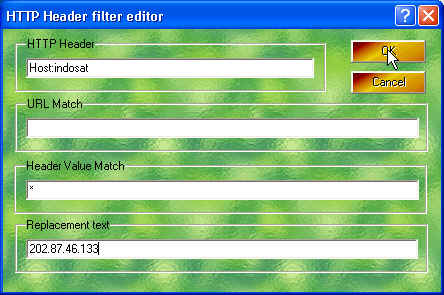
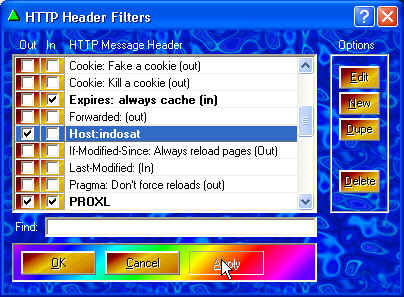
Sett Proxo >> Headers >> New >> HTTP Header diisi host:indosat >> URL Match kosongin >> Header Value Match * (bintang) >> Replacement text 202.87.46.133 >> Ok >> Apply >> centang out >> ok
Proxy 10.19.19.19:8080 (proxy isat)

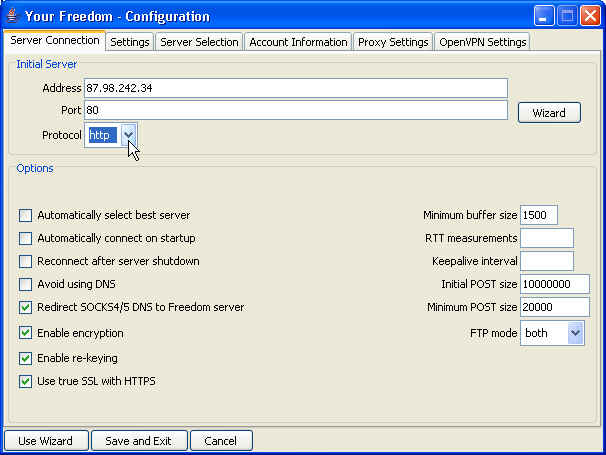
Sett YF >> configuration >> address terserah ems berapa, protocol https >> proxy setting 127.0.0.1:8080

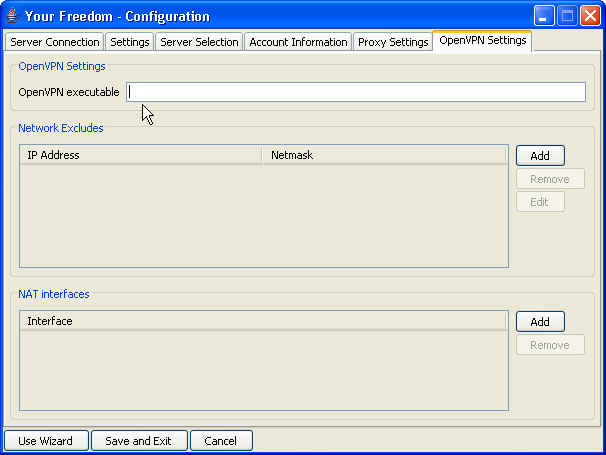
>> OpenVPN setting diisi C:\Program Files\OpenVPN\bin\openvpn.exe (tergantung tempat instal, openVPN hrs diinstal) >> save&exit

>> buka port centang semua >> web proxy 4444 (terserah, yg penting sett proxy browser jg ngikut 4444) >> start connection

Sett proxy browser 127.0.0.1:4444 (ngikut port proxy web YF)

=============================================================

TRIK TANPA PROXO

Your Freedom Configure :

  • Server connection, address : wap3g.indosat.com@ems…… atau 202.87.46.133@ems…..
  • Port : 443, protocol : HTTPS
  • Proxy Settings, proxy:10.19.19.19:8080
  • Save & Exit
  • Start connection
  • Sett proxy browser 127.0.0.1:8080

=============================================================

TRIK MMS GRATIS INDOSAT

Ganti settingan MMS Homepage jadi https://smsc.indosat.com

=============================================================

INFO LAIN :

ariefew.co.cc

Mempercepat Akses Internet dengan cFosSpeed

Pada tranfer data TCP/IP di Windows, sejumlah data harus dikonfirmasikan dahulu
sebelum data itu dikirim. Konfirmasi ini biasanya waktu (delay), yang terkadang
membikin arus aliran data tersebut tidak lancar / lambat ( transfer-rate
slowdowns
). Hal ini terutama terjadi pada DSL dan kabel, yang mana terjadi
penyempitan bandwidth sehingga konfirmasi data tidak cukup bandwidth.
Solusi dari ini kita bisa mencoba memperbesar TCP window size, dengan demikian
membiarkan lebih banyak data yang dikirim tanpa konfirmasi yang segera. Masalahnya
disini, hal ini juga mengarah pada high ping times (latency) dan masa
tunggu (delays)
utama pada render halaman web (Webpage rendering).
Latency lebih dari 2 detik, bukanlah luar biasa untuk TCP windows
yang sebesar 64k. Dengan kata lain dari ini semua, ukuran-ukuran jendela (windows)
sangat besar peranannya dalam mencapai kecepatan download penuh.

cFos Traffic Shaping memprioritaskan lalu lintas data dalam paket-paket
penting. Cara ini, data masuk selalu tiba pada waktunya, dan upload-upload
tidak akan pernah menghambat koneksi broadband lagi. cFos Traffic-Shaping
technology recognizes
mengenali tipe paket penting dan memprioritaskannya
tidak hanya untuk pemeliharaan lalu lintas Internet yang lembut tetapi juga
untuk memastikan low ping times. Hal ini juga tidak hanya mempercepat
surfing dan download secara signifikan, tetapi juga merupakan
solusi untuk online gaming.

Setelah instalasi cFosSpeed, settingan yang utama ada di

  • Connect to… atau Options - Connection,
    yaitu settingan untu dialup connection dan router connection
  • Option - Setting - Preferences yaitu untuk Layer-7 Protocol
    Detection, Favour Ping Time, Activate Firewall, Automatic MSS (MTU) optimisation,
    Strict RTP checks.
  • Option - Setting - Protocol yaitu untuk setting priority
    dari DNS, SSL, FTP, Clien Protocol, Server Protocol, Media Streaming, File
    Sharing.
  • Option - Setting - Program yaitu untuk setting priority
    dari program yang akan kita gunakan seperti VOIP, Media Streaming, Game, File
    Sharing dll. Pada priority program ini kita bisa membuat definisi
    baru yang kita inginkan.

Untuk coba cFosSpeed silahkan
ambil di sini.

Silahkan dicoba, mungkin bermanfaat….

NB : file setup.exe akan terdeteksi trojan oleh antivirus, tapi hasil install tidak ada yang terdeteksi (Symantec AV, AVG, update 24/8/08)

ariefew.co.cc

Internet Gratis PRO-XL dengan Your-Freedom & cFosSpeed

Trik ini menggunakan Your-Freedom sebagai server

1. Connec proXL pake APN: www.xlgprs.net , Username: xlgprs password: proxl
2. Buka Your-Freedom kalau pada bagian konfigurasi server di pilih protokol UDP 53. emsnya terserah.
3. Start Connect YF nya
4. Setting http proxy di browser pake 127.0.0.1 port 8080
5. Selesai

Pemakaian secara langsung YF, masihlah terkena pulsa, hal ini dikarenakan adanya percarian server yang memakan waktu. Solusinya yaitu, pakailah ip yang telah aku scan pakai YF dibawah ini. Setting secara manual saja (di configure)…..

Name
Address
UDP
ems01.your-freedom.de
67.159.5.116
53
ems02.your-freedom.de
193.164.133.61
53
ems03.your-freedom.de
87.98.241.26
53
ems04.your-freedom.de
91.121.13.62
53
ems05.your-freedom.de
91.121.13.63
53
ems06.your-freedom.de
81.169.130.185
53
ems07.your-freedom.de
85.214.22.104
53
ems08.your-freedom.de
91.121.2.175
53
ems10.your-freedom.de
85.214.45.170
53
ems11.your-freedom.de
87.98.217.227
53
ems12.your-freedom.de
87.98.243.6
53
ems13.your-freedom.de
66.90.104.142
53
ems14.your-freedom.de
87.98.128.61
53
ems14.your-freedom.de
91.121.9.81
53
ems15.your-freedom.de
193.37.152.232
53
ems16.your-freedom.de
67.159.5.52
53
ems17.your-freedom.de
91.121.1.185
53
ems18.your-freedom.de
85.214.116.165
53
ems20.your-freedom.de
67.212.67.75
53
ems22.your-freedom.de
202.64.77.113
53
ems23.your-freedom.de
62.193.231.70
53

( pilih salah satu… )

Untuk cara setting, seperti yang disebutkan blog2 lainnya, yaitu daftar dulu di website YF. Download YF file. Install. Konek HP dengan PC. DialUp ( APN: www.xlgprs.net , Username: xlgprs password: proxl ). Running YF.

Pada cara biasa, setelah “welcome” [next]. Isi proxy address & port dengan punya XL (202.152.240.050 : 8080), [next]. Tunggu sampai keluar tulisan “all fine!…..” warna hijau. [next] Select protocols, [next]. Melakukan pencarian freedom server. Pilih salah satu server.

Tapi trik disini, hindarilah pencarian server tersebut dengan cara diatas. Setting semua secara manual. Pada YF - Status - Action - klik configure. di tabs Server connection isi server address & port seperti diatas, dan protocol isi udp. Pada tabs Account Information isi dengan username dan password yang telah di daftarkan. Pada tabs Proxy Setting isi Proxy Address & port dengan punyanya XL. Start Connection….. (sampai conection status muncul tulisannya semua, jika muncul isian voucer, isi dengan angka yang tertulis dikolomnya, dan klik “ok”).

untuk mempercepat connection gunakan cFos
Browser pakai K-Meleon dengan proxy 127.0.0.1 : 8080 ( biar enteng )

Pada penulisan Posting ini, trik ini masih jalan. Aku menggunakan kartu yang dipakai cek “123″ atau “*123#” sudah tidak bisa…. :-)

Untuk install dan setting Your Freedom secara lengkap dan umum, silahkan ke Install dan Setting YF

ariefew.co.cc

Thursday, September 4, 2008

Permasalahan Pada Pengaktifan GPRS XL

Wordpress version

Jika kita membeli perdana XL bebas. Di halaman depan pasti terpampang logo “XL jangkauan luas”, dan “TARIF TERMURAH Rp. 0,1/dtk ke semua operator, serta photo Luna Maya yang siiip. Tapi di halaman depan tersebut tidaklah kupermasalahkan, itu sah-sah saja. Walaupun dalam kenyataannya untuk telpon yang Rp.0,1/dtk itu ada syaratnya…….
Di halaman belakang, terdapat tulisan :

Fitur Unggulan XL bebas
Kualitas GSM dan 3G dengan jangkauan nasional yang luas

  • Langsung aktif XL 3G
  • Gratis Roaming Nasional
  • Gratis roaming internasional (SMS)
  • Bisa berbagi pulsa dengan sesama XL
  • Layanan Data

Terus jika kita buka, juga terdapat tulisan yang hampir sama maksudnya dengan diatas.

Tambahan Fitur XL bebas lainnya :

  • ………
  • Langsung aktif XL-3G
  • ………
  • GPRS
  • MMS
  • Layanan Data
  • ……….

Kemudian kita buka SIMCard, kita pasang ke ponsel kita. Setelah registrasi kartu, kita matikan dan hidupkan ponsel lagi….. Wow… Settingan XL GPRS dan XL MMS langsung terpasang !!! Tapi jangan gembira dulu….. Lakukan browsing dengan internet dengan ponsel….. tidak bisa….. Data Connection not Available….. Mungkin kita mengira permasalahan di settingan GPRS yang otomatis tadi. Ternyata bukan (kalau gak percaya, silahkan setting via SMS (bayar)). Lalu dimanakah letak permasalahannya….. Telpon ke 817 (bayar Rp.350/nelpon), pasti dapat jawaban “kartunya sudah aktif…”, “Silahkan setting lewat SMS..”, “Permasalahan bukan pada kartunya tapi pada ponsel anda”, “Silahkan refress ponsel anda”, dll….. Jika berulang-ulang tepon, habislah pulsa kita dengan percuma…..

Mungkin menurutku untuk mengatasi ini, adalah laporan lewat email. seperti yang kulakukan pada waktu lalu….

Pengaktifan GPRS sulit
Wednesday, August 27, 2008 11:59 AM
From:
“Arief EW”

To:
“customerservice@xl.co.id”

Kartu saya dengan nomor 08170323****, dari pembelian kartu perdana sampai sekarang GPRS belum aktif.
Kucoba telpon 817, sangatlah payah. Waktu menunggu untuk dapat bicara Customer Representative XL, membutuhkan waktu lebih dari 5 menit. Itupun kadang-kadang putus sendiri. Hal tersebut mungkin tidak terlalu menjadi masalah jika tidak terkena Rp. 350/nelpon.
Dari beberapa telpon Customer Representative XL, semua mengatakan bahwa nomor diatas GPRS-nya sudah aktif. Jadi tidak ada masalah di kartunya, permasalahan ada ponselnya. Semua jawaban hampir sama.
1.Kuterangkan bahwa aku pakai ponsel Nokia 6210c yang dapat melakukan penyettingan GPRS dan MMS secara otomatis menurut Operator Selularnya. Oleh Customer Representative XL malah disuruh penyetingan MMS dan GPRS lewat SMS ke 9667. Setelah kulakukan GPRS NOKIA 6210, ternyata type HP tidak ada dan untuk nokia disuruh ganti dengan 6233. Kulakukan GPRS NOKIA 6233. Succes, dapat sms balasan. Save “Yes”. Kucoba buka browsing, tetap tidak bisa “Packet Data not Available. Cek Network Service”. Sama dengan sebelumnya. Kubuka setingan yang lewat OTA dan ternyata settingannya sama dengan yang otomatis lewat ponsel Nokia.
2. Kucoba pinjam kartu XL teman, kupasang di ponselku. Kucoba Browsing dengan settingan GPRS tetap, ternyata bisa connecting.
3. Kartuku kutancapkan ke ponsel teman yang pakai XL dan GPRS aktif. Gak bisa….
No.1,2,3 selalu kuterangkan pada Customer Representative XL tiap kutelpon 817. dari semua jawaban dan saran dari Customer Representative XL, ternyata belum ada jawaban yang memuaskan.
dari pembelian pulsa perdana yang mempunya pulsa awal Rp. 10.000,- karena masalah ini, sekarang tinggal Rp.6.080,- hanya untuk tepon 817 dan sms 9667 tanpa telpon dan sms lainnya.
Hendaknya “Luna Maya” memperhatikan masalah ini. Tidak hanya menonjolkan Rp 0,1/dt atau “sampai puasss”. Untuk sampai puas, ganti aja dengan “sampai jengkellll”
Apakah Kartuku tersebut di atasi masalahnya…. Jawab secepatnya. Mumpung belum isi pulsa lagi. Kalau tidak bisa, kubuang aja.

Setelah kukirim email tersebut (jam 12), sorenya mendapat jawaban bahwa email sudah masuk dan jam kerja untuk pemrosesan adalah pukul…….bla….bla….. Besok paginya mendapat email lagi dengan isi “… email anda sedang saya proses dan kami serahkan ke bagian yang terkait…….”. Malamnya GPRS kartuku aktif. Wah, photo Luna maya diganti dengan kamping aja !! mungkin lebih cocok….
Twitter Delicious Facebook Digg Favorites More